javascript / performance / memory / v8
JavaScript Array Internals: Memory Layout Without the Myths
JavaScript arrays are objects with specialized element storage: engines may pack dense indexed elements contiguously, but holes, mixed types, and properties force more general representations.
In this article
A brief outline
Reading lens / representation
Storage follows the shape of the data
- Pack
Dense indexed values can stay in compact element storage.
- Deopt
Holes, mixed types, and properties change the representation.
- Measure
Use engine behavior as a performance clue, not a contract.
A small experiment
An empty slot is not a value
Change index 2 and compare what JavaScript can observe.
- 010
- 120
- 230
- 340
- 450
- a.length
- 5
- Object.hasOwn(a, 2)
- true
- a[2]
- 30
These are observable values, not a physical memory layout.
Index 2 holds 30. All five indexed properties are present.
Opening answer
A JavaScript Array is specified as an exotic object with special handling for the length property and indexed elements (ECMAScript — Array Exotic Objects). Engines then apply representation optimizations: dense numeric sequences may be stored in packed element stores; holes, attribute changes, or mixed types push the engine toward more general (and usually slower) layouts.
There is no single “C array” guaranteed by the language. There are spec semantics plus engine element kinds.
Spec semantics vs engine storage
Spec-level facts
- Arrays are objects; indices are string keys with special length behavior.
lengthis constrained and interacts with adding/removing indexed properties.- Holes (
emptyslots, not the valueundefined) are real:new Array(3)is not the same as[undefined, undefined, undefined].
MDN’s Array documentation covers the developer-facing behavior that follows from the specification.
Engine-level optimizations (V8-oriented mental model)
Modern engines detect common patterns and choose specialized element storage. V8 literature discusses property and element storage strategies (see Fast properties for the broader “fast object” philosophy). Exact element-kind names and transitions are implementation details and must not be treated as language guarantees.
A useful conceptual spectrum:
packed SMI / packed double / packed elements
        ↓ (holes, deletes, hard transitions)
holey variants
        ↓ (attributes, prototype tricks, extremes)
dictionary / slow modes
When people say “the array became holey,” they mean the engine no longer treats the indexed range as a dense packed store.
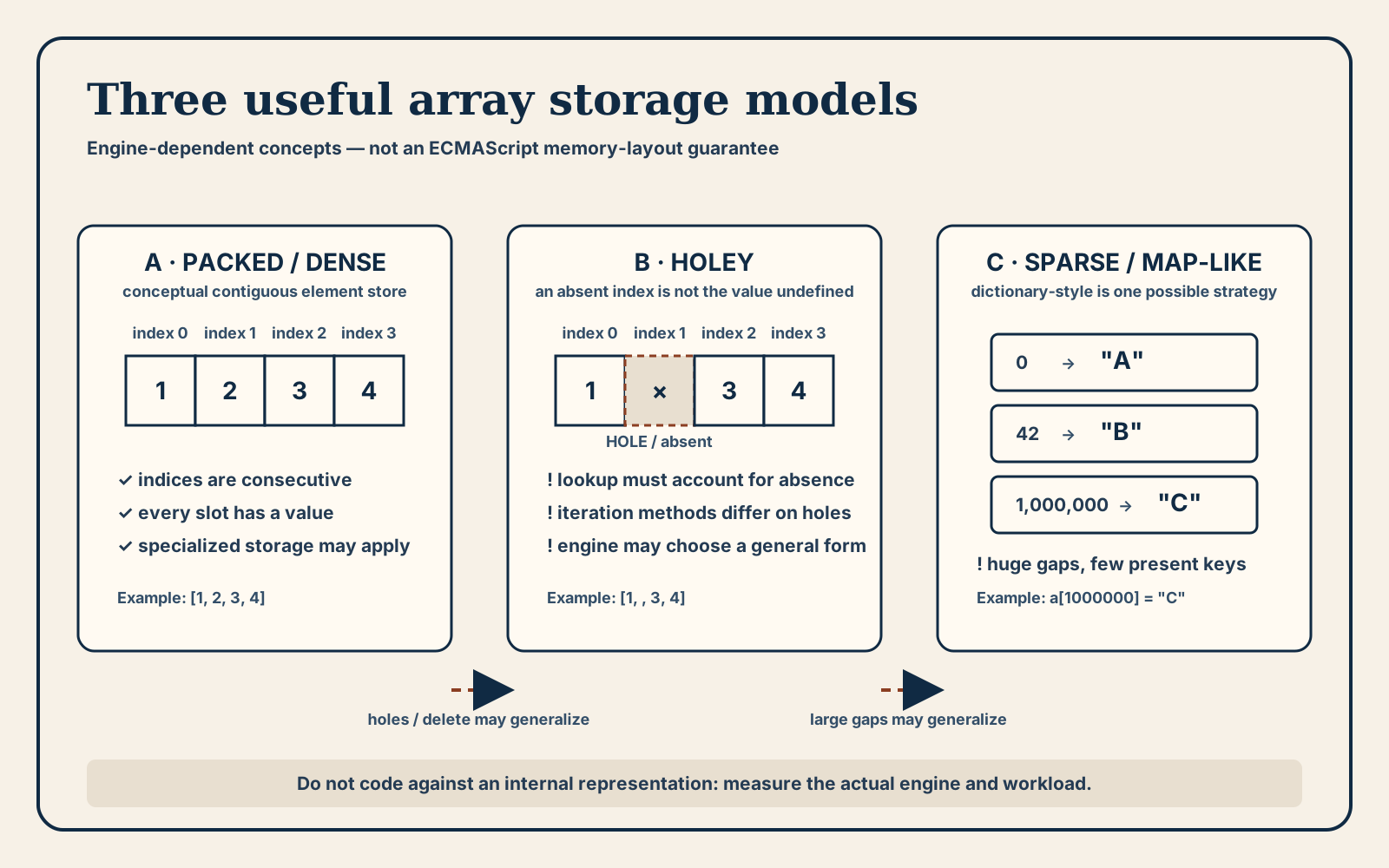
Read the three panels as possible optimization models, not a transition guarantee. An engine may specialize consecutive present indices, account for a missing index in a holey representation, or use a map-like strategy for a few widely separated keys. The specification preserves observable array behavior while leaving those storage choices to each engine.
Dense, holey, and sparse patterns
Dense packed
const xs = [1, 2, 3, 4];
Consecutive indices from 0 without holes are the best case for packed storage.
Holes
const ys = [1, , 3]; // hole at index 1
const zs = new Array(1000); // length 1000, no indexed elements yet
Holes force more careful iteration semantics (for vs forEach vs sparse iteration) and often less specialized storage.
Sparse high indices
const sparse = [];
sparse[1000000] = 1;
Creating huge gaps is a classic way to leave “looks like an array” territory and pay object-map costs.
Practical rules (without fake benchmarks)
These rules follow from representation costs and real-world engine behavior. They are guidelines, not stopwatch claims:
- Build arrays densely when you can — prefer
pushinto a growing dense array over writing random high indices. - Avoid
delete arr[i]for hot arrays. Useundefinedonly when a present undefined value is acceptable, or rebuild the array.deletecreates a hole. - Keep element types stable in hot paths — mixing objects and numbers can force more general element stores.
- Do not pre-allocate with
new Array(n)unless you immediately fill densely — you start with holes. - Measure with your engine and workload — microbenchmarks lie; use realistic data shapes.
Iteration semantics to respect
const a = [1, , 3];

for (let i = 0; i < a.length; i++) {
  // visits index 1 as undefined
}

a.forEach((value) => {
  // skips holes
});
Choosing the wrong iteration style is a correctness bug first, performance issue second.
Typed arrays are a different tool
When you need true contiguous numeric buffers (binary protocols, WebGL, audio), use TypedArray / ArrayBuffer. They are fixed-type packed memory by design. Ordinary Array remains the flexible dynamic structure for general application data (MDN Array).
Takeaway
JavaScript arrays combine exotic-object semantics with aggressive engine specialization. Dense, type-stable index usage keeps you on faster element representations; holes, deletes, and sparse writes push you toward general object storage. Learn the semantics from the specification and MDN; treat engine element kinds as a performance model to guide structure—not as APIs you code against.