Lesson 6 of 19 · 9 min read
Give DSH a task you can actually review
A practical workflow for DeepSeek Harness: set the boundary, gather context, agree on a plan, make small edits, and check the evidence before keeping the patch.
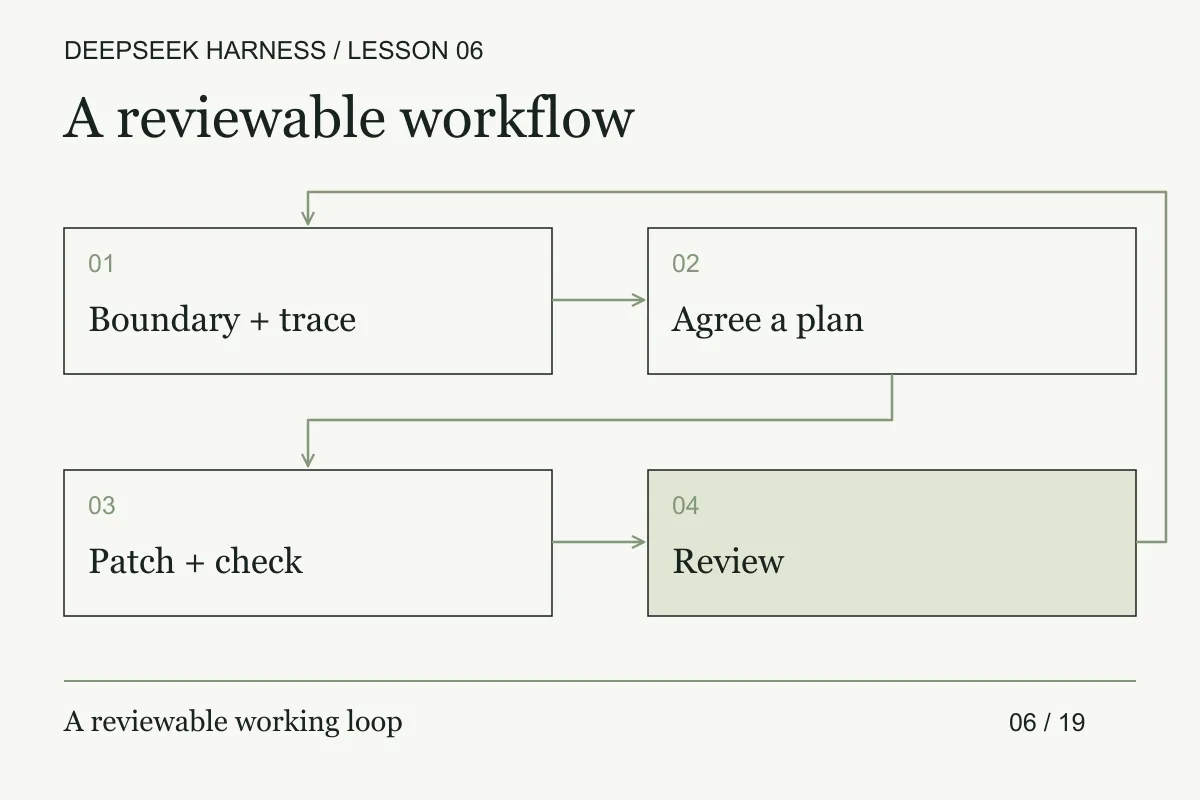
Course syllabus · lesson 6 of 19
In this lesson
If you already use Codex or Claude Code, the expensive part of an agent task is familiar: a large diff, a test you cannot reproduce, and no clear reason for half the changes. The remedy is not a longer prompt. It is a brief that makes scope, evidence, and stop conditions explicit before the agent edits a file.
Use the workflow below as a review protocol for an existing engineering practice. It is a recommended working method, not an official DSH recipe or a claim that one prompt works best for every model. The product details were checked on September 13, 2026. The Web UI guide documents workspace selection, sessions, planning capability, and approval requests under the active policy.
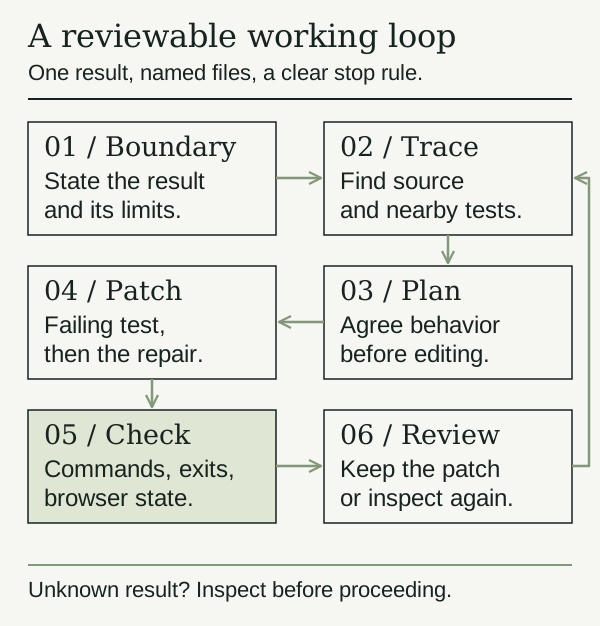
1. Write the boundary before the prompt
Choose one result a reviewer can observe. “Improve search” is too open. “An older response must never replace results for the current query” gives you a testable requirement.
Use a disposable practice environment without sensitive files. Record the starting revision and existing changes. Keep a separate backup of work that has not been committed; a branch name alone does not preserve uncommitted files. DeepSeek's safety notice warns that the preview is unaudited and its controls do not guarantee isolation. A prompt is not a filesystem boundary.
Goal: prevent stale search responses from replacing the current query.
Allowed: the search controller, result view, and their tests.
Keep: the API contract, styling, keyboard behavior, and unrelated edits.
Done means: a deterministic race test fails before the fix and passes after it.
First inspect and propose a plan. Do not edit yet.
Do not install packages, read secrets, commit, push, or deploy.
If the fix needs a wider boundary, explain why and wait.
Replace the example scope with real paths after inspecting your repository. State forbidden operations separately from the files that may change. That makes an unexpected dependency installation or broad refactor easier to spot.
2. Gather the context that changes the decision
Ask DSH to trace the relevant path and cite files: user input, request construction, asynchronous completion, state update, and visible result. Ask for the nearest tests and the commands already defined by the project. Check the cited code yourself.
The useful output is a small dependency map and one plausible failure mechanism. If the agent gives you a directory tour, narrow the question. If it proposes a command that could write data, inspect its effect before authorizing it.
3. Choose capabilities and permissions separately
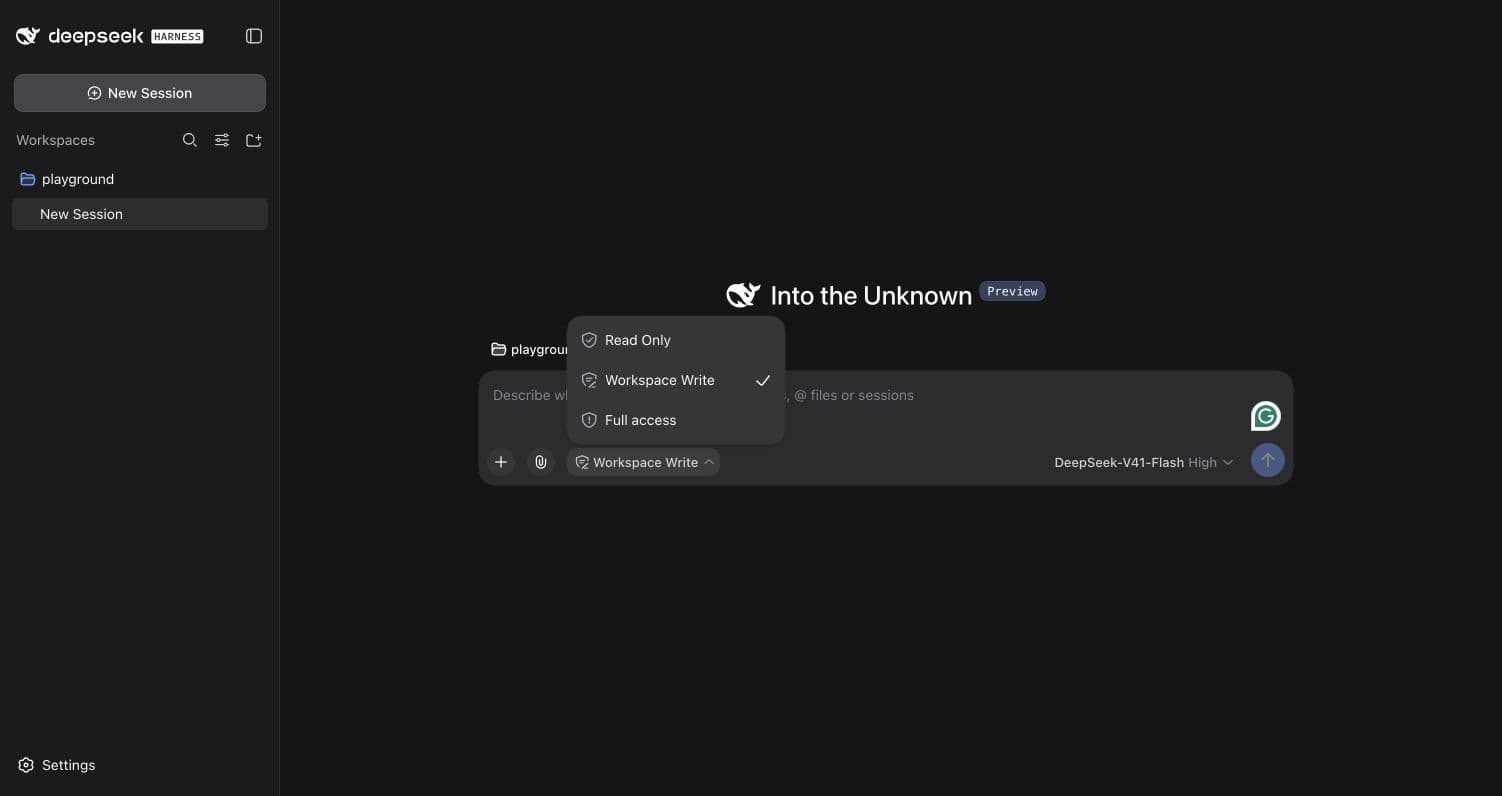
For a normal code fix, Standard is a sensible starting point. The official mode descriptions describe Code as exposing tools through an SDK so a model can combine operations in TypeScript. That is useful to experiment with after you have a baseline; it is not evidence of better results. Creator is for working on agent composition. See the mode lesson for the current Minimal caveat.
A mode label is not a promise of read-only access. Check the active permissions and the environment's actual access separately. DSH asks for approval where the policy requires it, not necessarily before every edit. Review the target, command, and expected effect of an approval request. Do not broaden access just to remove a pause.
4. Make the plan small enough to stop
Ask for three outputs: the test that exposes the bug, the smallest repair, and the checks that could reveal regressions. Resolve missing product decisions before editing. For search, clearing results while loading versus keeping them visible is a decision for the product, not an incidental choice for the agent.
Then authorize one slice: add the failing test. Inspect why it fails. Authorize the implementation only when that failure describes the requirement. Keep formatting sweeps, unrelated cleanup, and dependency upgrades out of this patch.
5. Verify the patch, then review the claim
Require actual commands, exit codes, and relevant output. Run the focused check and the repository's existing broader checks. A UI task also needs a browser check: keyboard, loading, empty results, errors, narrow screens, and any changed motion. A passing unit test cannot establish those behaviors.
Report the changed paths and the reason for each.
List checks actually run, with their exit codes.
Separate passing checks, failures, and checks not run.
Identify any remaining assumptions and how to verify them.
Do not call the task complete while a required check is missing.
Read the diff against the original boundary. Check for unrelated changes and for tests weakened to make the run green. Keep the change only after the evidence supports it. A second review can catch omissions, but another agent saying “looks good” is not a substitute for a reproduction.
6. Recover from the state you have
An interruption is not proof that nothing happened. The current session repair source distinguishes calls not recorded as started from calls with an unknown outcome. That repairs the conversation record; it does not roll back a filesystem edit.
Pause new work, inspect the diff and running task state, and identify the last verified checkpoint. Retry a read-only check when safe. Do not blindly repeat an operation that may already have written data. If the patch must be discarded, preserve unrelated work and remove only the changes you have identified. A fresh practice copy is often the clearest recovery path.
Add a change budget and a stop rule
An experienced workflow benefits from a small change budget. Before the agent starts, set the maximum files it may touch, the directories it may not touch, the checks that must remain unchanged, and the point where it must stop for a decision. The budget is a review aid, not a substitute for authorization.
For example, a task brief can say: “Inspect up to six files. Change one source file and one focused test. Do not alter dependencies, generated output, configuration, or snapshots. Stop if the fix requires a third file.” That creates a useful escalation point. A third file may be the correct solution, but it changes the risk and deserves a new plan.
Keep an acceptance contract beside the prompt:
Required: the focused test fails on the baseline and passes after the repair.
Required: the diff stays inside the allowed paths.
Required: the changed behavior has a regression test.
Unknown: browser behavior and performance were not measured.
Forbidden: commit, push, dependency installation, or credential access.
The distinction between required and unknown prevents a polished report from hiding an untested claim. The distinction between forbidden and unavailable tells the next operator whether to retry or stop. If the task crosses the budget, preserve the current evidence, return to inspection, and revise the contract before allowing more edits.
When handing the work to a reviewer, include the starting revision, allowed paths, actual commands, exit codes, unresolved questions, and the first safe next action. A reviewer should not have to reconstruct the run from a chat transcript. This is the point where a harness becomes part of an engineering process rather than an opaque source of patches.
This is where DSH becomes useful: the harness can connect inspection, tools, and results across a task. Your job is to make the boundary and acceptance test clear enough to tell whether those actions helped.
Before you move on
Try it in your workspace
Write a bounded brief for a real maintenance task. Inspect the diff and named checks, then record one model claim whose truth depends on repository evidence outside the conversation.
Keep a short note of what you tried, what passed, and what you still need to check.
0 of 3 checked.
Saved in this browser when storage is available. Uncheck any item to revisit it. This is your own record, not an assessment.