Lesson 9 of 19 · 12 min read
Build a web environment around DSH, with boundaries
Reuse the agent loop, sessions, tools, and browser surface without mistaking a local harness for a secure multi-tenant service. A staged path from a disposable prototype to a reviewed architecture.
Course syllabus · lesson 9 of 19
In this lesson
If you already run coding agents locally, a browser deployment exposes the parts your terminal hides. The chat box is the easy part. A useful web agent also needs to remember the session, call the right tools, show what happened, and stop before it damages something. DSH gives you components to study and extend. It does not turn those responsibilities into a solved deployment problem.
The project's safety notice is direct: this is unaudited developer-preview software, not a secure or production-ready system. Use it in a disposable environment with minimal access. Do not make it the sole security boundary for untrusted workloads. The architecture below is a reviewable evaluation design, not a tested hosted DSH deployment.
Pick a web use case with a reviewable result
Good starting exercises include a repository assistant that proposes a small UI repair, a documentation workbench that drafts changes from an approved source folder, or a test-triage workspace that reproduces a failure and returns evidence. These are proposed applications, not claims about bundled DSH products.
For a first custom environment, I would choose the documentation workbench. Give it a disposable copy of a public documentation repository. Let it inspect the existing format, draft one change, and run the repository's checks. Show the diff to a person before any release action. That gives the tool a useful job without granting access to production infrastructure.
Keep the output contract small: a patch, source references, command results, and unresolved questions. “Build my whole website and publish it” combines too many permissions and verification steps for a first trial.
What you can reuse
The architecture reference describes replaceable plugins for the agent loop, model adapter, tool registry, and session log. Profiles compose bundles and patch layers. Those are extension points to investigate before forking core behavior.
The Web bundle provides browser chat, settings and model management, and session history. Browser sessions compose their own agents from presets; the reference also documents adding custom presets. Reusing this application is different from importing a ready-made, stable React widget into any website. Verify the current client contracts before designing an embedding strategy.
The base bundle composes model access, tools, persistence, permission policy, and telemetry for base-backed profiles. It is a bundle, not a library to import directly. Start from the existing composition and remove unnecessary authority before adding capabilities.
For the documentation exercise, a custom preset could give the session a narrow task brief and the required tool composition. A domain plugin could expose a bounded documentation operation. Build from the plugin lesson and the current package contracts. A mode name or an instruction saying “read-only” is not itself access enforcement.
Compose first; fork when the UI really needs it
For a local source trial, the repository README gives this setup:
git clone https://github.com/deepseek-ai/deepseek-harness.git
cd deepseek-harness
pnpm install
pnpm run build
pnpm dsh web
Run it in the disposable environment, not a directory containing private projects or deployment credentials. Record the revision and dependency state before customization. The repository warns that compatibility-breaking changes are expected; pin and test upgrades instead of treating today's plugin contract as permanent.
The documented composition order is bundle layers, profile patch, home patch, then invocation patches. A patch replaces a row's whole configuration rather than merging individual fields. Preserve required policy settings when overriding a row. See the architecture reference and base-bundle guidance.
My suggested order is: reproduce the stock local behavior, add one bounded plugin or preset, test its failure paths, then change the UI if the product requires it. A fork makes sense for substantial application-level changes, but it also gives you responsibility for tracking upstream fixes and retesting your divergence.
The MIT license permits modification and redistribution subject to its notice requirements, and disclaims warranty. Retain the required notices and inspect the third-party license disclosures linked from the README. That license is permission to work with the software, not a security certification.
Separate product identity from the local Web login
The stock Web surface has an authentication mechanism: its bundle reference describes a process-token handoff, signed cookie, and Host/Origin checks. Do not remove these controls to make a prototype easier to connect.
There is a documentation inconsistency worth noticing: the same page discusses all-interface LAN binding but also says it is unsupported. The current startup source explicitly rejects --host 0.0.0.0. This is source inspection, not a remote-deployment test. Keep the trial on its default loopback surface; do not work around the restriction to publish a shell-capable server.
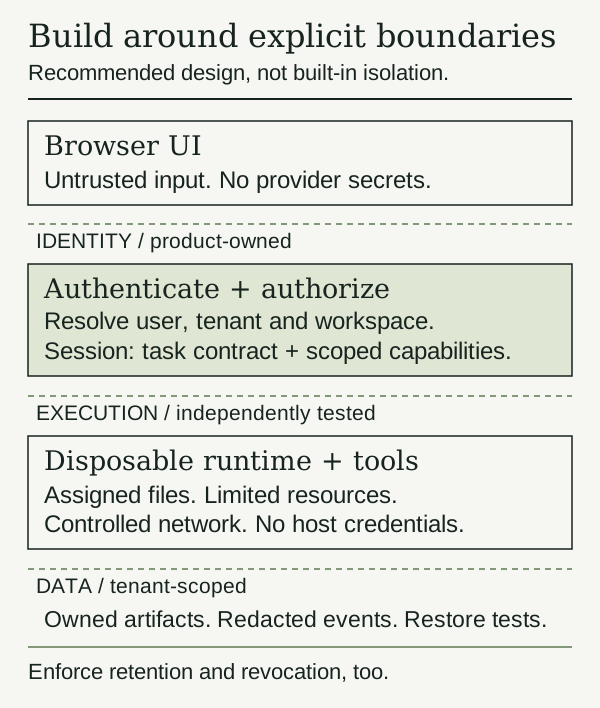
For a team-facing product, design identity and authorization separately. Authenticate each person, resolve the authorized tenant and workspace on the server, and check ownership for every session, artifact, tool request, and live stream. Do not trust a browser-supplied workspace path or session id as authority. A reverse proxy login alone does not prove that all backend operations enforce those rules.
Test negative cases: user A cannot read user B's history, resume their agent, download their artifacts, or subscribe to their events. A revoked user must lose access to existing connections as well as new requests. These are recommended acceptance tests, not guarantees established by the local Web cookie.
Put tools behind a real execution boundary
The process sandbox contract limits its mode vocabulary to filesystem effects; network and process visibility are outside that vocabulary. Enforcement can be partial on some backends. It also distinguishes local subprocess sandboxing from replacing whole capabilities with container or remote implementations. Do not read “workspace-write” as “safe to run arbitrary tenant code.”
For the proposed hosted workbench, keep the web control service separate from disposable execution environments. Give each job only its assigned checkout and temporary space. Do not mount host home directories, container-control sockets, cloud credentials, or other tenants' files. Restrict outbound network access, subprocess resources, execution time, and artifact size outside the model's prompt.
Treat repository text, fetched pages, and generated code as untrusted input. Tool implementations should validate arguments and authorize the operation again at the boundary. A permission prompt helps a person make a decision; it does not replace an allowlist or protect a secret already visible to the runtime.
Choose and test the isolation mechanism with security specialists. The drawing does not claim DSH ships this hosted runtime controller, scheduler, or tenant sandbox. If you cannot demonstrate the boundary, keep the workload local and trusted.
Make storage and observability part of the design
Keep model credentials server-side and out of browser bundles, prompts, screenshots, source trees, and downloadable logs. Prefer narrowly scoped, short-lived credentials where the provider supports them. Plan rotation and revocation. A tool should receive the smallest capability needed, not a general production key.
Session persistence is useful for recovery, but saved conversations and tool output may contain sensitive content. Scope storage to the tenant and session; define retention, deletion, encryption, backup access, and restore tests. Isolate mutable caches and generated artifacts too. A shared process or global storage directory needs an explicit design review before multiple users enter it.
Inspect telemetry before the first private trial. The base-bundle reference documents feedback-triggered OTel session upload, including context, and a disabled capture setting. Do not assume clicking feedback sends only the comment. Verify the composed exporter and destinations, minimize captured data, and make any transmission policy visible to users.
For your own audit trail, record the authorized user, tenant, session, job, tool action, approval decision, outcome, and artifact reference. Redact before export. Separate operational metrics from full conversation contents. Check that errors and cancellation logs do not leak prompts or credentials. A log that merely exists is not proof that a restore or incident investigation will work.
Adopt in stages, with a stop rule at each one
Turn the boundaries into acceptance tests
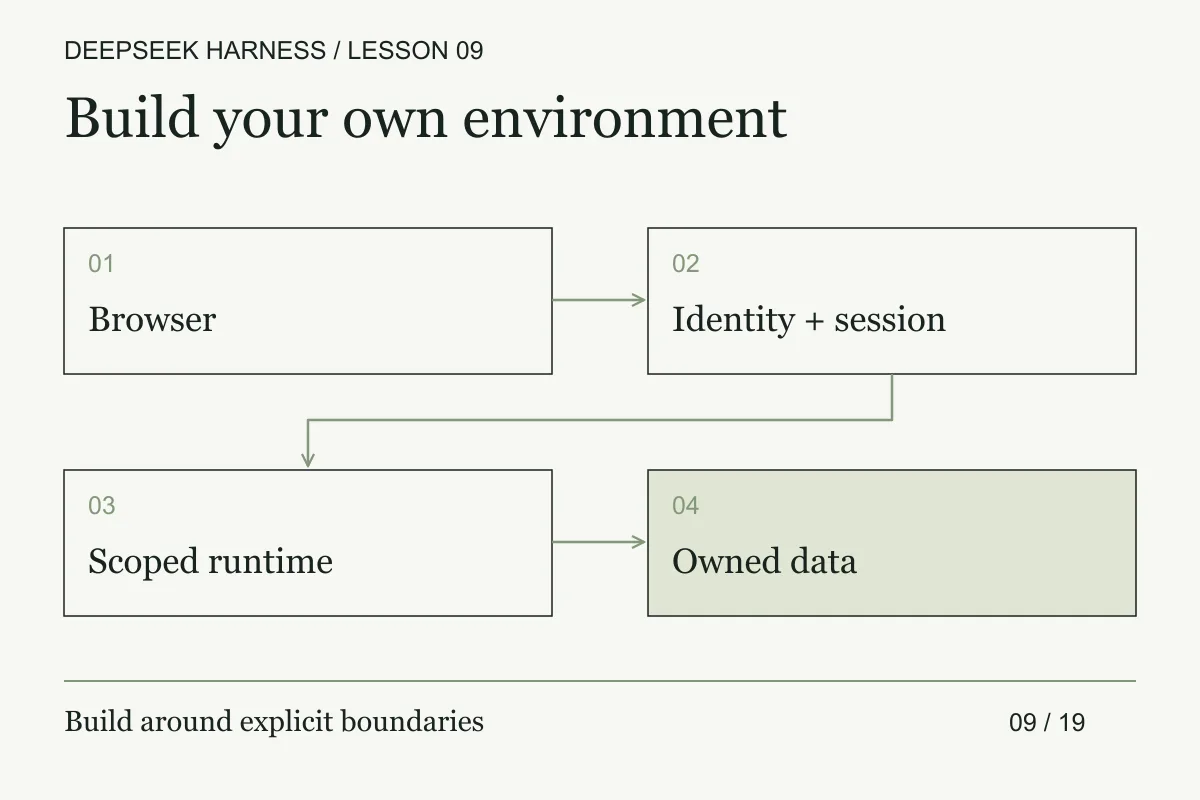
Draw the request path from browser to stored result before building the UI. Name the identity and tenant at the boundary, the session owner, the runtime allocation, the tool policy, and the data record that receives the result. For every arrow, write what is authenticated, what is user-controlled, and what is logged. If a value crosses from one boundary to the next without an owner, the design is unfinished.
Use a small threat and failure matrix for the prototype. For each case, record the required behavior and the evidence that proves it:
- A user opening another tenant's session id must be rejected before runtime access. Keep an authorization test and audit event.
- A browser sending a path outside the assigned workspace must be normalized, denied, and logged. Keep a tool-policy test.
- A runtime disappearing during a write must produce an unknown outcome and quarantine the job. Keep a recovery record.
- A provider returning a secret in output must trigger redaction before persistence and display. Keep a redaction test.
- A user losing access during a run must lose future actions while ownership stays clear. Keep a revocation test.
These are product acceptance criteria, not features supplied automatically by a local harness. Test them at the server boundary with fake runtimes before connecting a provider. Then test the browser's loading, reconnect, and failure states against the same event model. A disabled button is not authorization, and hiding a session from the UI is not deletion.
Keep tenant data and runtime files separate from the process that serves the web UI when the risk warrants it. Define retention, deletion, backup, restore, resource limits, network egress, and upgrade rollback as operational decisions. The first prototype can stay single-user, but record that limitation so a later demo does not quietly become a multi-tenant claim.
- Local prototype: One trusted operator, public practice data, disposable runtime, and no deployment credentials. Exit only after the proposed tool's success, refusal, invalid-input, timeout, and cleanup behavior is tested.
- Controlled team trial: Establish identity, ownership checks, isolated jobs, reviewed plugins, retention policy, and cost/resource limits. Exercise cross-user denials and restore from interruption. Stop if any session or artifact can cross the intended boundary.
- Production decision: Require a threat model, independent security review, operational ownership, monitoring, backup/restore evidence, upgrade and rollback plans, and load/failure tests. The upstream preview warning remains; passing a demo does not make the current Harness production-ready.
For the documentation workbench, an acceptable first result is modest: one reviewed patch, traceable sources, reproducible checks, and no ability to publish it without a separate release decision. Once that works, parallel agents may help with independent investigations. They do not remove any of these boundaries.
DSH is useful here because you can reuse and inspect the machinery around the model. The custom product still owns its users, permissions, data, runtime isolation, and operational failures. Build those deliberately; do not hide them behind the chat interface.
Before you move on
Try it in your workspace
Sketch the browser, session service, runtime, and provider boundaries. For each one, name the identity check, permitted actions, failure signal, and denial test.
Keep a short note of what you tried, what passed, and what you still need to check.
0 of 3 checked.
Saved in this browser when storage is available. Uncheck any item to revisit it. This is your own record, not an assessment.